
The phrase “year of the Linux desktop” has survived so many failed predictions that it now functions as a joke. Gaming deserves a narrower test: can a player buy Linux-based hardware, sign in, install a current game, use a controller, and trust that updates will not become a troubleshooting session?
For much of the Steam catalog, the answer in 2026 is already yes. Linux is not about to replace Windows, but it may be crossing a more useful threshold: from enthusiast configuration to a product ordinary players can buy and use without thinking about the operating system underneath it.
The Market Share Is Niche, But the Product Is Real
The Steam Hardware & Software Survey reported Linux at 3.90% of surveyed Steam systems in August 2026, compared with 93.95% for Windows and 2.14% for macOS. The survey is optional, anonymous, and monthly, so a single result should not be treated as a perfect census. Even so, roughly 4% is large enough to matter to developers while remaining far from a Windows-scale market.
More revealing is how those players reach Linux. SteamOS Holo represented 0.82% of surveyed systems; the rest was spread across several distributions. Momentum is increasingly tied to hardware that hides that fragmentation behind a console-like interface.
Valve says on its SteamOS overview that more than 18,000 Steam titles ran through Proton the last time it counted, with Steam Deck and Lenovo Legion Go S officially supported and broader AMD handheld compatibility improving. That is a product story, not simply a desktop market-share story.
Related Articles
- Does AutoZone Carry Motorcycle Batteries?
- Linux Enterprise Server vs Windows Server
- Best Battery Backup Systems for Home, UPS & Solar
- How to Recover Files from Raspberry Pi Memory Card
- Build a Powerful and Affordable Raspberry Pi Media Server
- Raspberry Pi 5 Pinout, Specifications, and Pricing: A Complete Guide
Proton Changed What Linux Support Means
Native Linux and Proton-compatible Windows releases are different production choices. A native build has a Linux executable, Linux libraries, and usually a separate Steam depot. The studio owns another build and QA surface, which works only if the team can maintain it after launch.
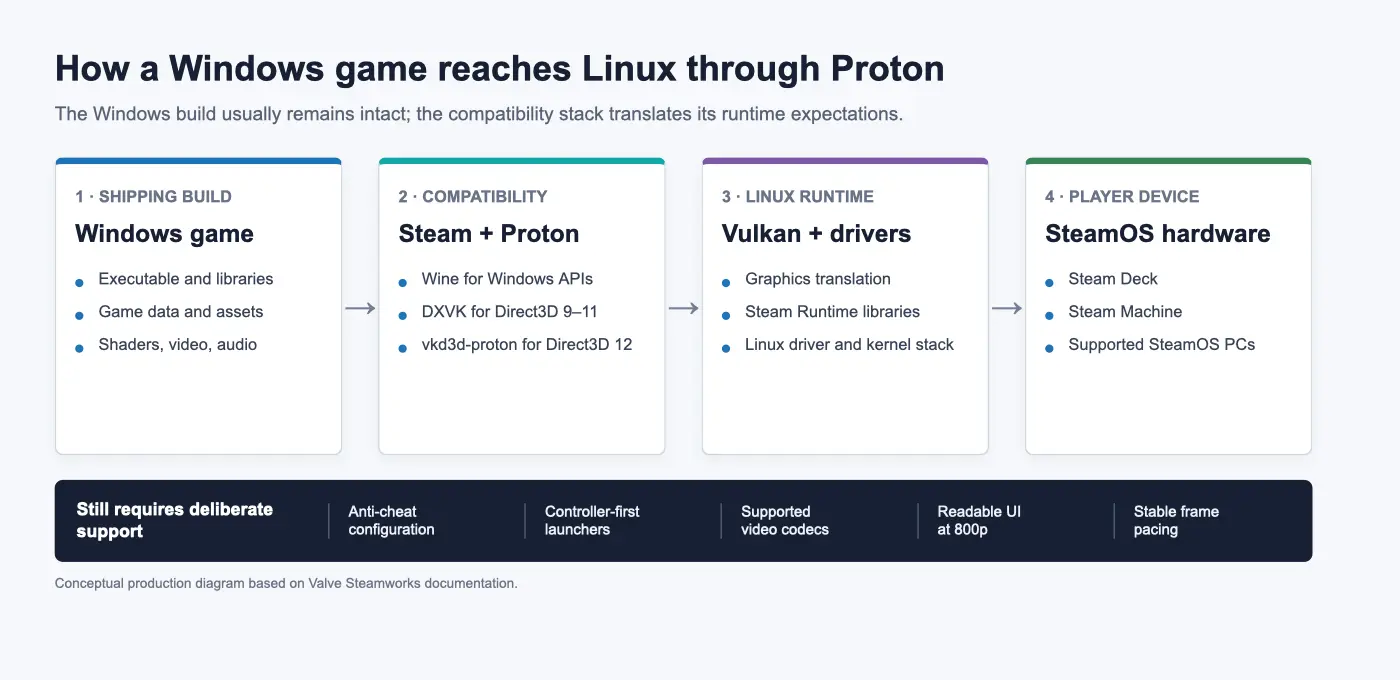
Proton often removes the need for that separate build. Valve’s Steam Hardware compatibility rules explain that SteamOS can take the current Windows executable and game data and run them through Proton. Wine translates Windows-facing system behavior, while DXVK and vkd3d-proton translate Direct3D calls toward Vulkan. The Steam Runtime supplies a controlled library environment so the game depends less on whichever packages happen to be installed on the host distribution.
This is neither full PC emulation nor a traditional port. It is a compatibility layer around the shipped Windows build. Valve tests a native Linux build first when one exists, but may recommend the Windows build under Proton if it performs better. Linux support can therefore mean one deliberately compatible Windows build instead of a second executable that receives less testing.
Proton Is Not Automatically a Performance Tax
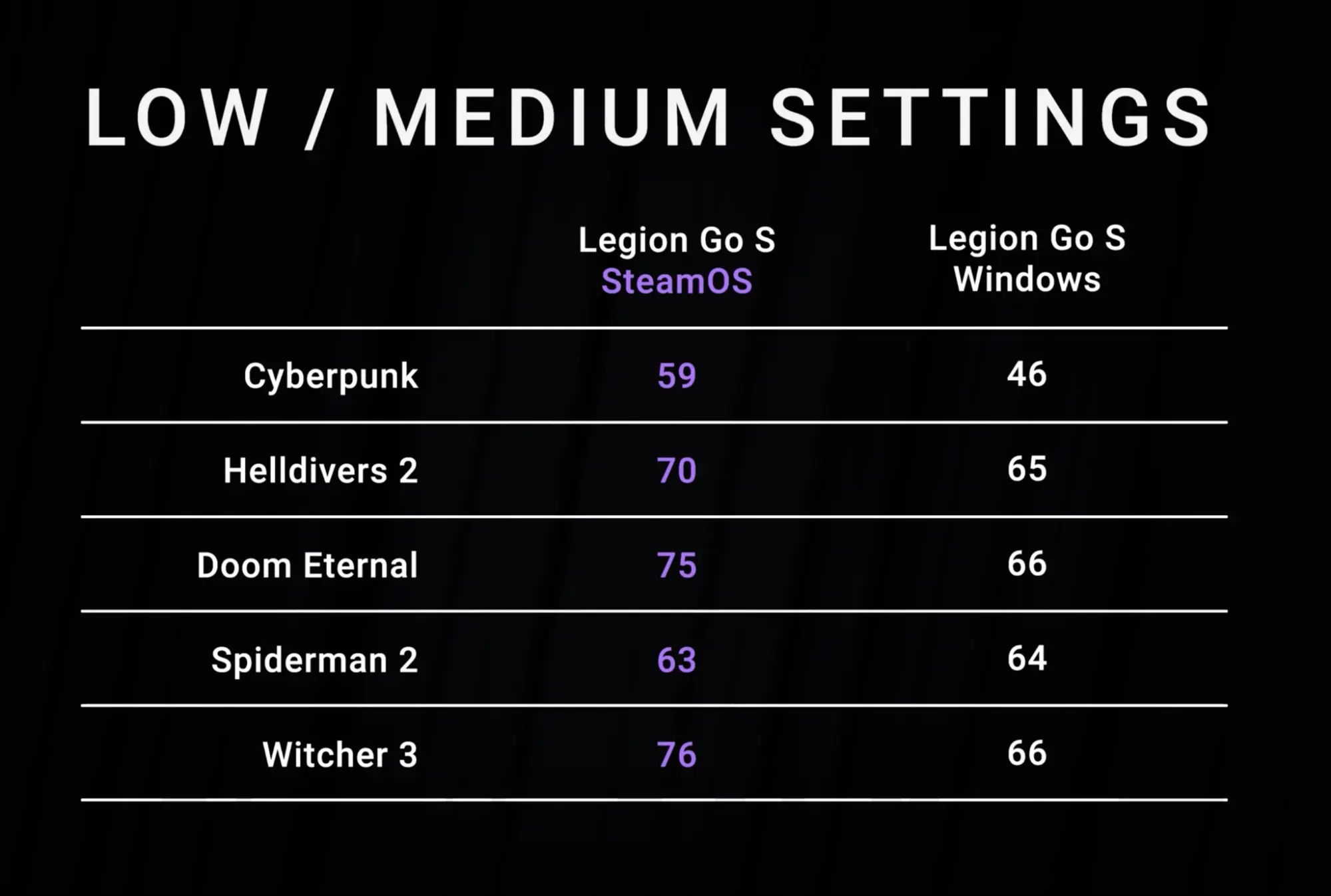
In a same-device test, Ars Technica benchmarked five recent games on a Lenovo Legion Go S under SteamOS 3.7, then installed Windows 11 on that same handheld and reran the Steam versions. SteamOS led noticeably in four of five titles, while Borderlands 3 was effectively tied. Newer unofficial AMD-compatible drivers narrowed several Windows gaps, so the result is not evidence that Linux is universally faster. It shows that Proton’s translation cost can be outweighed by the rest of the stack: Mesa drivers, shader handling, power management, and a game-focused OS with less background overhead.
SteamOS Is Becoming a Hardware Platform
Steam Deck proved that Linux could disappear behind a coherent gaming appliance. The interface handles installation, controller profiles, updates, suspend and resume, and compatibility labels. The stack succeeds because the player does not need to understand it.
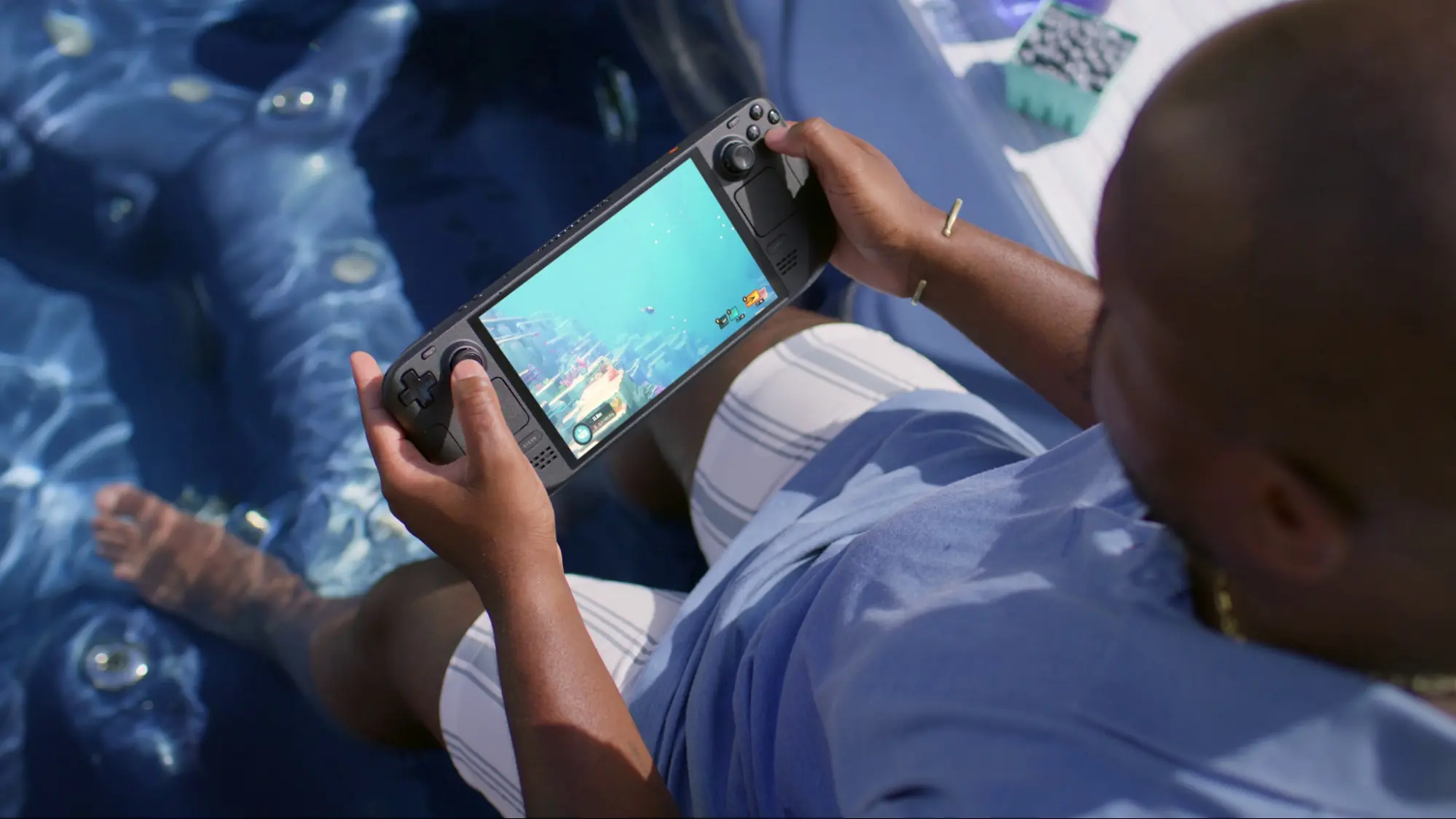
The 2026 Steam Machine extends that model to the living room. Steamworks now produces ratings for Steam Deck, Steam Machine, and third-party SteamOS devices. A game verified on Deck is guaranteed to be verified on Steam Machine, turning compatibility into a repeatable hardware target.
Linux itself is not a hardware specification. Hackatronic’s Raspberry Pi 5 guide is a useful contrast: the board uses an Arm Cortex-A76 CPU and a VideoCore VII GPU, whereas mainstream SteamOS compatibility is built around PC game binaries and supported graphics stacks. Installing Linux on an Arm single-board computer does not reproduce Steam Deck compatibility. Architecture, drivers, input, display, and thermal limits still define the target.
Why Major Games Still Fail?
The remaining failures are not explained well by “Linux cannot run games.” They usually sit at the edges of the executable: anti-cheat, DRM, launchers, media playback, account sign-in, or Windows-only assumptions.
Valve’s Proton guidance for developers says Easy Anti-Cheat and BattlEye are supported, but neither is automatic. Easy Anti-Cheat must be enabled for Linux and shipped with the required library; BattlEye needs per-title configuration. Kernel-space anti-cheat is not supported. When a competitive game remains unavailable, the blocker may be a publisher or middleware decision rather than a missing graphics feature.
Launchers are another weak point. A .NET or WPF launcher can fail before the game starts, while mouse-only navigation undermines a controller-first device. Unsupported codecs can break a cinematic, and anti-tamper can add instability. These small components can make the whole product appear unsupported.
Compatibility must survive live operations. Anti-cheat updates, launcher redesigns, engine upgrades, and new Proton versions can all cause regressions. Valve retests in several of these situations, but studios still need SteamOS in their release checks if the badge is to describe the current build.
What Developers Should Test Before Calling a Game Compatible?
The lowest-risk strategy is not automatically “build a native Linux version.” Many studios should keep one supported Windows build, test it through current stable and experimental Proton branches, and fix the assumptions that fail. Native Linux is a good choice only when the team can own its dependencies, middleware, crash reporting, and patches.
Compatibility review has to cover the asset pipeline, not just code. The production scope documented by a game art company shows that external art production can reach well beyond source files: engine-ready assets for Unity, Unreal, and Godot, plus animation, VFX, technical art, asset integration, scene assembly, QA, and cross-platform optimization. That breadth matters for SteamOS: shaders may compile differently through another graphics stack, texture and LOD budgets may miss the device, video may rely on an unsupported codec, and HUD layouts may break at 1280 x 800. Test the assembled release depot on real SteamOS hardware, not only individual assets in a DCC tool or the Windows editor.
A practical pre-release pass should cover the following:
- Boot the actual release depot through Proton, not only an editor or development executable.
- Remove the launcher where possible; otherwise make every action controller-navigable and show glyphs for the active input device.
- Test the full UI at 1280 x 800. Check minimum text size, contrast, tooltips, virtual keyboard behavior, and 16:10 layouts.
- Audit file paths, capitalization, save locations, permissions, and cloud-sync behavior on a case-sensitive file system.
- Use portable video formats such as VP9 or AV1 and verify every cinematic, tutorial, and menu background.
- Enable supported anti-cheat explicitly, then test matchmaking, reconnects, bans, spectating, and post-update behavior.
- Profile shader compilation, frame pacing, memory, suspend and resume, battery-oriented settings, and a playable default graphics preset.
What Would Make 2026 a Genuine Milestone?
Linux does not need to win a desktop market-share contest. It needs to become predictable where players and studios make decisions. Four signals would make 2026 different from the years of hopeful headlines:
- More PCs and handhelds ship with SteamOS preinstalled, with drivers and updates owned by the device vendor.
- Major multiplayer publishers enable supported anti-cheat instead of treating Linux users as an unsupported exception.
- Compatibility ratings remain accurate after patches, middleware changes, and launcher updates.
- Studios test Proton, controller UX, media, UI, and asset performance before launch rather than after community reports arrive.
The Useful Verdict for Linux Gaming in 2026
If “the year of Linux gaming” means Linux overtakes Windows, then no. If it means Linux becomes a credible consumer platform with a large playable catalog, recognizable hardware, documented certification, and a realistic developer workflow, then 2026 has a serious claim. The decisive sign is a player pressing Install without needing to know whether the game used a native executable or Proton. Linux gaming succeeds when compatibility becomes infrastructure and platform support becomes part of production, not a community workaround.
Best Battery Backup Systems for Home, UPS & Solar (2026 Guide)
Linux Enterprise Server vs Windows Server: Which Fits Your Business?
Raspberry Pi 5 Pinout, Specifications, and Pricing: A Complete Guide
